
TL;DR
- Complete highest Throne Spire level first to automatically claim all lower tier rewards
- Use sailing coin chests to complete guild quests instead of sailing co-op events
- Access integrated dungeons remotely via Alt+Q and navigate maps using Tab+Alt+L shortcuts
- Master inventory management with Alt+Left click sort locking and Ctrl+Right click auction searches
- Customize cursor visibility with Ctrl+wheel and teleport to stronghold feasts instantly
- Skip honing animations with special honing to save cumulative waiting time
Korean Lost Ark veterans have developed sophisticated time-saving techniques that can dramatically improve your gameplay efficiency. These methods focus on eliminating unnecessary travel, streamlining progression systems, and mastering interface shortcuts that many Western players overlook. By implementing these strategies, you’ll reclaim hours of playtime each week while achieving better results across all game systems.
The Korean gaming culture emphasizes optimization and efficiency, treating time as the most valuable in-game currency. This guide translates their most effective approaches into actionable techniques you can implement immediately.
Throne Spire Efficiency
Many players mistakenly climb Throne Spire sequentially from level 1, unaware that completing the highest available floor automatically grants all rewards from lower tiers. This intelligent reward cascade system eliminates redundant clears while maximizing your weekly progression gains. Always target the highest floor you can complete rather than working through levels incrementally.
Strategic spire progression can save 45-60 minutes weekly while providing identical rewards. This approach is particularly valuable during progression pushes when every minute counts toward reaching new content thresholds.
Guild Quest Alternatives
Guild sailing co-op quest completion no longer requires physical participation in sailing events. Instead, use sailing coin selection chests from your inventory—these count toward quest completion when opened. This method eliminates travel time and scheduling conflicts while providing identical credit.
Common mistake: Players waste 15-20 minutes sailing to co-op locations when the quest could be completed instantly through inventory management.
Faster Honing
Honing animations consume significant cumulative time that can be bypassed using the special honing feature. This skippable animation feature is often overlooked by players focused on the RNG outcome rather than time investment.
(1)_1663320284.jpg)
Advanced technique: Combine special honing with pre-crafted materials to process multiple upgrades in rapid succession, potentially saving 2-3 hours monthly for active players.
Stronghold Feast Teleportation
Walking to stronghold feast tables is completely unnecessary with the built-in teleportation system. Click the two-person icon in the top left interface to view visiting players, then use the position icon for instant transportation directly to the feast location.
Pro tip: Always provide a thumbs-up to players hosting feasts—this encourages continued community sharing while acknowledging their contribution to your efficiency gains.
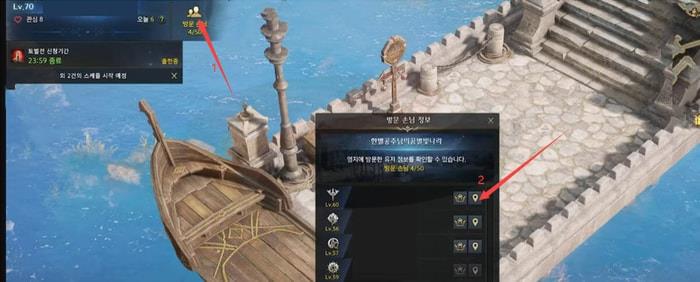
This navigation method applies to all stronghold visitor interactions, not just feast events. Mastering this can save 5-10 minutes per stronghold visit.
Portal Access Mastery
While most players use the M key for world map portal access, the Tab map provides identical functionality with additional convenience. Open your area map with Tab, then use Alt+L click on any portal for instant transportation.
Geographic insight: Southern and Northern Vern operate as connected continents with seamless portal transitions. Understanding this regional connectivity prevents unnecessary sailing or overland travel between these zones.
Integrated Dungeon Access
Physical travel to raid dungeons is obsolete with the integrated dungeon interface (Alt+Q). This centralized hub provides remote access to party formation, dungeon entry, and raid content with customizable organization.
Advanced navigation: The integrated dungeon system allows sorting by difficulty, reward type, or completion status—features unavailable through physical dungeon access.
Finding Items Efficiently
Locating specific items becomes effortless using the Alt+D search function, which accesses Lost Ark’s comprehensive item database. This tool locates virtually every obtainable item while providing acquisition methods and current market prices.
Database mastery: The search function includes filters for equipment type, rarity, and acquisition source, making it invaluable for progression planning and resource allocation.
Auction House Integration
Ctrl+Right click on items provides direct auction house search functionality, bypassing multiple interface layers. This integration represents one of Lost Ark’s most sophisticated quality-of-life features.
Market efficiency: This shortcut automatically populates search parameters with the selected item, displaying current listings, historical prices, and purchase options.
Cursor Customization
Quick cursor color changes are possible without menu navigation using Ctrl+mouse wheel cycling. This is particularly valuable during combat when visibility becomes critical.
Visibility optimization: Different cursor colors improve tracking during chaotic encounters or against varying background environments.
Sort Locking Mastery
Inventory auto-sorting frustration ends with Alt+Left click sort locking, which preserves specific item arrangements while maintaining organizational efficiency.
Advanced inventory management: Sort locking works across all storage systems, including personal inventory, roster storage, and character-specific containers.
Battle Item Presets
Battle item configurations become instantly accessible using Ctrl+Q, W, E, R shortcuts for rapid combat preparation. This system supports multiple preset configurations for different content types.
Combat readiness: Pre-configured battle item sets ensure optimal loadouts for specific encounters without manual item-by-item selection.
Common Efficiency Mistakes
New players frequently waste time through inefficient navigation, redundant content clearing, and underutilized interface shortcuts. Recognizing these patterns early prevents development of time-wasting habits.
Optimization mindset: Korean players approach Lost Ark with efficiency as a core gameplay principle, constantly seeking to minimize time investment while maximizing progression gains.
Time investment analysis: The average player can reclaim 3-5 hours weekly by implementing these techniques—time better spent on new content or additional progression activities.
Implementing these Korean-developed efficiency techniques will transform your Lost Ark experience, providing more accomplishment in less time while reducing gameplay frustration.
Action Checklist
- Complete highest Throne Spire floor first to claim all lower rewards automatically
- Use sailing coin chests from inventory to complete guild quests instead of sailing to co-op events
- Enable special honing to skip animation sequences during gear upgrades
- Master stronghold teleportation via visitor list for instant feast access
- Practice Tab map portal navigation with Alt+L click for efficient travel
- Configure battle item presets using Ctrl+Q/W/E/R shortcuts
- Implement Alt+Left click sort locking to maintain preferred inventory organization
No reproduction without permission:OnLineGames Guides » Lost Ark Guide: Tips for Saving Time Essential Lost Ark efficiency tips from Korean veterans to optimize gameplay and save valuable time