
Master stream branding essentials from logo design to overlay implementation for professional streaming success
Essential Branding Components for Streamers
Establishing a distinctive streaming brand identity serves as the foundation for building viewer loyalty and professional recognition in the competitive streaming landscape. A well-crafted brand image not only enhances your channel’s visual appeal but also creates memorable touchpoints that keep audiences engaged and coming back for more content.
Merchandise sales represent a significant revenue stream for content creators, but their success depends entirely on how effectively they embody your unique personality and design aesthetic. This is where strategic logo development and overlay integration become crucial assets. Beyond revenue potential, cohesive branding signals professional commitment that distinguishes serious streamers from casual broadcasters.
Multiple visual elements combine to form your complete streaming brand identity. While creative approaches vary significantly between streamers, several core components consistently deliver the strongest impact and are worth prioritizing in your branding investment strategy.
Your logo serves as the cornerstone of your visual identity. Approach logo design with careful consideration of how it represents your streaming persona and content focus. Evaluate whether pre-made designs align with your vision or if custom creation better captures your unique streaming personality and thematic elements.
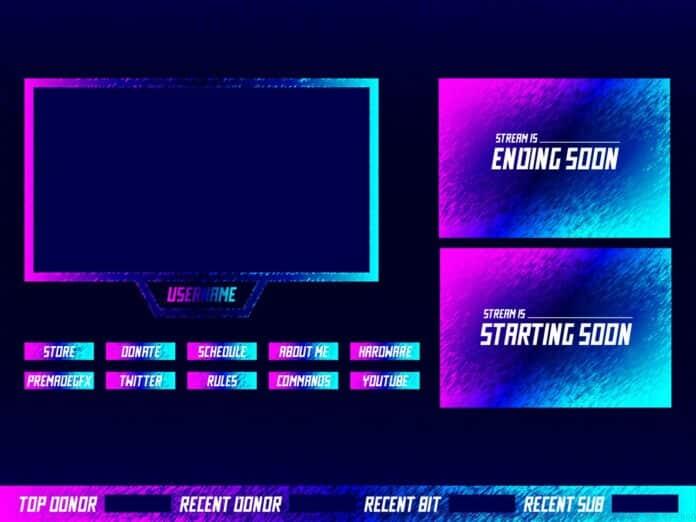
Once your primary logo is established, overlay selection becomes the next critical step. These visual elements must maintain design consistency with your logo’s color palette, stylistic approach, and overall thematic direction—crucial factors to evaluate when selecting Twitch overlay packages.
Technical Implementation: Setting Up Your Overlays
With branding assets prepared, the technical implementation phase begins with overlay integration into your broadcast setup. This requires streaming software such as OBS Studio or Streamlabs OBS (SLOBS), which provide comprehensive customization capabilities for your stream’s visual presentation and layout design.
Overlay integration utilizes either image sources for static elements or media sources for animated components. All source elements within broadcasting software can be precisely positioned and scaled to achieve your desired layout composition. Image sources handle stationary visual elements like webcam borders, informational labels, or header graphics, while media sources manage dynamic content such as animated “starting soon” screens or motion-enhanced webcam overlays.
Streaming software organizes content through scenes, which function as separate containers for different source combinations that can be seamlessly switched during broadcasts. Practical applications include distinct scenes for live gameplay, intermission periods, and starting sequences, with separated sources enabling smooth transitions between broadcasting states.
Numerous comprehensive tutorials exist covering various streaming software platforms. When encountering setup challenges, seek out platform-specific YouTube guides that address your particular software version and technical requirements for optimal troubleshooting assistance.
Channel Branding Optimization
Twitch channels provide multiple branding opportunities beyond live stream content. The platform’s channel customization features allow comprehensive brand expression through carefully designed visual elements that communicate your streaming identity even during offline periods.
Most streaming overlay packages include complementary channel branding components, but verification ensures complete asset coverage. Sourcing all visual elements from a unified design package guarantees stylistic consistency across your entire channel presentation. A significant advantage of comprehensive channel branding is its ability to convey your content theme and streaming personality to potential viewers when you’re not actively broadcasting.
Twitch panels offer valuable real estate for communicating essential information to potential community members. These elements can display your streaming schedule, social media connections, donation information, and channel rules—all contributing to a professionally branded viewing experience that encourages audience engagement and retention.
Advanced Branding Strategies
The professional advantages of comprehensive stream branding extend far beyond basic visual appeal. Strategic branding demonstrates dedication to content quality and viewer experience, signaling to audiences that you value their engagement and take your streaming presence seriously. Overlays form the visual foundation of every streamer’s brand identity, unifying various broadcast elements while consistently reinforcing brand recognition.
With overlay implementation knowledge secured, you possess a significant competitive advantage in the streaming landscape. However, avoid these common mistakes: inconsistent color schemes across platforms, overcrowded overlays that distract from content, and mismatched design elements that confuse brand identity. Instead, focus on creating a cohesive visual language that scales across merchandise, social media, and streaming platforms.
Advanced streamers should consider seasonal branding updates to maintain visual freshness while retaining core identity elements. Additionally, A/B testing different overlay configurations can reveal which designs most effectively drive engagement and subscriber conversions. Remember that your brand represents a promise to viewers about the quality and type of content they can expect from your channel.
No reproduction without permission:OnLineGames Guides » Stream Branding: How To Add Overlays To Twitch Master stream branding essentials from logo design to overlay implementation for professional streaming success