
Complete guide to creating professional CSGO weapon skins from concept to Steam Workshop submission
Understanding CSGO Skin Creation Fundamentals
For any CSGO enthusiast who has spent time in the game, the vibrant ecosystem of weapon skins becomes immediately apparent. These cosmetic enhancements, while having zero impact on actual gameplay mechanics, have cultivated an enormous following among players worldwide. The visual customization they provide has become an integral part of the game’s identity and community culture.
Acquiring skins typically happens through two primary channels: opening randomized cases or purchasing directly from the Steam Community Market. The financial spectrum is staggering, with skin values ranging from mere pennies to astronomical sums exceeding fifty thousand dollars for rare, coveted designs. This economic landscape makes skin creation both an artistic pursuit and potential revenue stream.
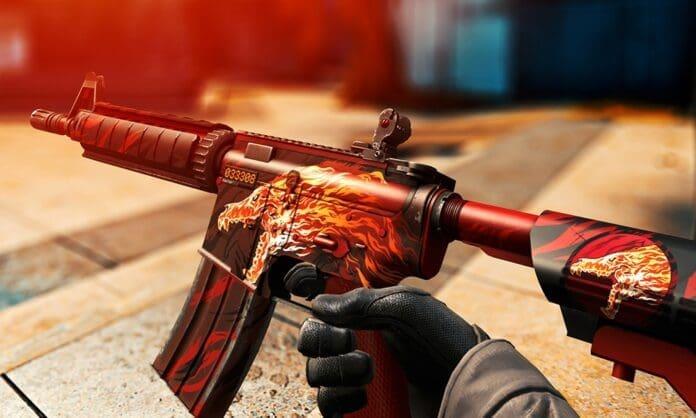
With CSGO’s player base expanding annually, interest in custom skin development has surged dramatically. Creative individuals can design their own weapon finishes and submit them to the Steam Workshop. Successful submissions that gain community support may be selected by Valve for inclusion in future weapon cases, providing both recognition and financial reward.
Currently, Valve is hosting a major art competition with a million-dollar prize pool, where ten exceptional creators will each receive one hundred thousand dollars. This presents an incredible opportunity for both established skin designers and newcomers to showcase their talents.
Essential Software and File Preparation
While the fundamental process of creating CSGO skins isn’t overwhelmingly technical, producing professional-quality designs demands significant time investment and artistic skill. Adobe Photoshop remains the industry standard for skin creation, though alternatives like GIMP or Affinity Photo can also be effective for budget-conscious creators.
Critical preparatory steps for successful skin development:
Begin by sourcing the necessary weapon template files from reliable skin and accessory repositories. You’ll require both TGA (Targa) and OBJ (Object) file formats for your chosen weapon. The TGA file handles texture mapping while the OBJ file contains the 3D model data essential for previewing your design.
Professional creators often recommend starting with popular weapons like the AK-47 or AWP, as these have larger canvas areas that allow for more detailed artwork. Additionally, studying existing popular skins in the workshop can provide valuable inspiration and technical insights.
Before diving into complex designs, familiarize yourself with CSGO’s UV mapping system. Each weapon has unique texture coordinates that determine how your 2D design wraps around the 3D model. Understanding these patterns early will save countless hours of frustration later in the process.
Step-by-Step Skin Creation Process
The TGA file serves as your texture canvas, enabling precise mapping onto the weapon model. Utilize the Edit Texture function within your 3D modeling software to observe real-time updates as you modify your design. This immediate visual feedback is crucial for understanding how your 2D artwork translates to the 3D weapon surface.
Once your workspace is prepared, begin applying colors and patterns across the various weapon segments. Establish a foundational base color before introducing complex textures or detailed artwork. This layered approach ensures consistent visual cohesion throughout your design. When satisfied with your skin’s appearance, preserve your work by saving the completed TGA file.
Following TGA completion, the next critical phase involves converting your texture using VtfEdit. Import your TGA file into this specialized tool and export it as a VTF (Valve Texture Format) file, which is the format CSGO’s engine requires for proper texture rendering.
Locate the necessary text file specifications on the official Steam Workshop documentation page. Input the file path directing to your newly created VTF file in the designated first line of this configuration document. Accuracy here is paramount for successful workshop integration.
Apply final refinements within the CSGO Workbench environment. Upload your completed files to preview how they appear in-game under various lighting conditions and environments. If the finalized design meets your quality standards, save the complete package to the workbench and initiate the submission process to the Steam Workshop.
Advanced Techniques and Professional Tips
Recommended | $1 Million CSGO Art Contest Announced by Valve
Avoid the common beginner mistake of overcomplicating designs early in the process. Start with simpler concepts that emphasize clean execution rather than excessive detail. Many successful skins use smart color theory and subtle patterns rather than busy, overwhelming artwork.
Optimize your file sizes without sacrificing quality. Oversized texture files can cause performance issues and may be rejected from the workshop. Learn proper compression techniques that maintain visual fidelity while meeting technical requirements.
Study market trends but don’t simply copy what’s popular. The most successful skin creators develop distinctive artistic styles that become recognizable to the community. Balance current trends with your unique creative vision for maximum impact.
Test your skins extensively in-game before submission. Different lighting conditions and weapon finishes can dramatically alter appearance. What looks perfect in your editing software might need adjustments for optimal in-game presentation.
Engage with the community throughout your creation process. Share work-in-progress screenshots, gather feedback, and build anticipation before official submission. Community support significantly increases your chances of workshop success and potential Valve selection.
No reproduction without permission:OnLineGames Guides » How to Create Skins in CSGO? Complete guide to creating professional CSGO weapon skins from concept to Steam Workshop submission